

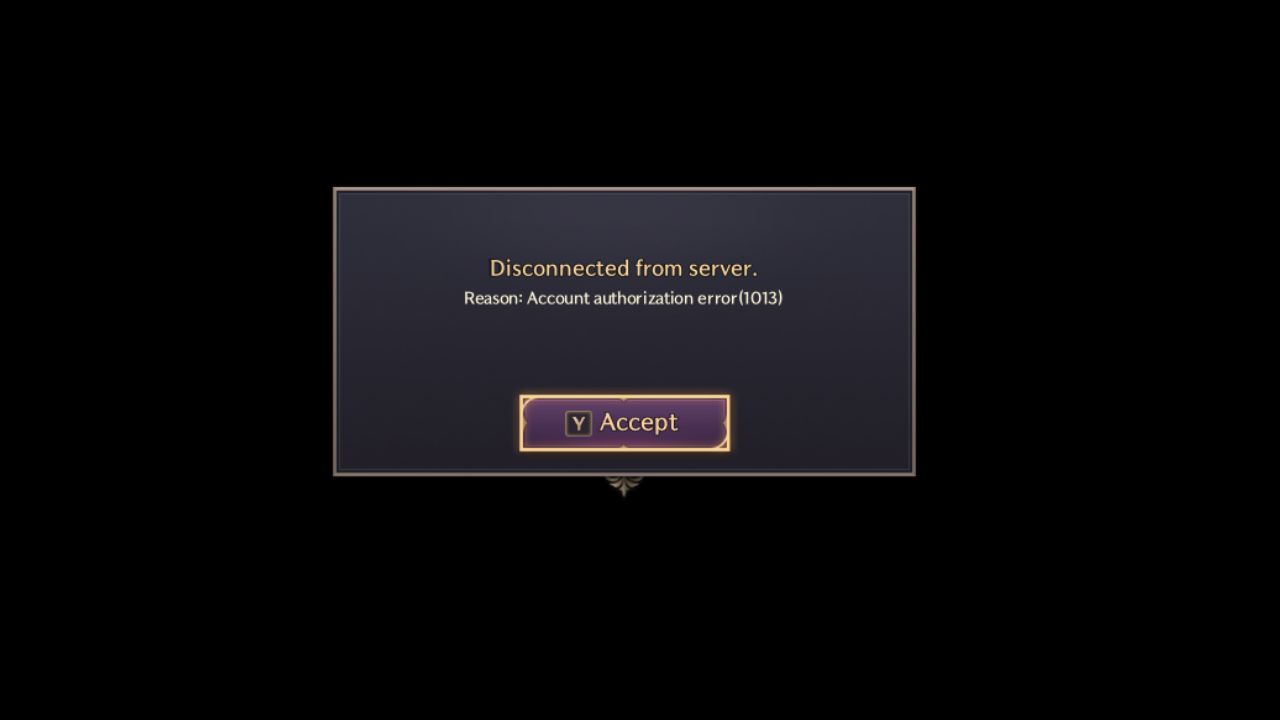
You know that sinking feeling when you’re all geared up to dive into *Throne and Liberty,* but instead, an error code throws a wrench into your gaming plans? Error 1013 can be a real buzzkill, but don’t worry—I’ve got you covered with complete information on how to tackle it head-on!
Understanding the Trouble
So, what exactly is this Error 1013? Let’s break it down! Essentially, it’s an issue primarily related to the game’s account authorization process. Now before you start pulling your hair out thinking you’ve been banned or something—relax! This problem usually boils down to some technical hiccups with anti-cheat settings, outdated files lurking in your directories, or mismatched tokens after a network wobble.
You might be wondering why this happens in the first place. Well, think of Error 1013 like those pesky paper jams in a printer—it won’t ruin your life, but it sure is annoying. Usually, a conflict with the EasyAntiCheat system, some old file from a beta version you thought was long gone, or just a network glitch can kick up a fuss, leading to this error.
Identifying Common Causes
Alright, now that we’re acquainted with Error 1013, let’s dig a bit deeper into its most notorious causes:
Anti-Cheat Conflicts
Here’s the deal: EasyAntiCheat is your game’s bodyguard, and sometimes its a bit too zealous. Sudden game logouts or corrupted anti-cheat files can cause it to mess up authorization processes, leaving you stuck outside the gates of your favorite fantasy land. It’s like having a bouncer with a bad memory—annoying but fixable.
Residual Files
Have you ever cleaned up your room only to find out there are still stray socks under the bed? Well, uninstalling a game isn’t much different. Leftover files can hang around after beta versions, like old relics waiting to trip you up. The same goes for files lingering in your Local and Roaming folders after too many installs and uninstalls.
Connection Glitches
This one’s a classic—it’s always the Wi-Fi! A shaky network can cause authentication tokens to mismatch, making the game think you’re not who you say you are. It’s like trying to convince a robot bouncer you’re you when your internet connection gets all tongue-tied.
Step-by-Step Solutions
Ready to make Error 1013 a relic of the past? Let’s power through these steps one by one. It’s simple—just start from the top and work your way down.
Begin with Easy Fixes
1. Restart Your PC: Oh, the wonders of the trusty reboot! Sometimes, all it takes is restarting your computer to reset the anti-cheat token and clear this error. It’s a bit old-school, but there’s a reason why it’s usually the first thing support techs suggest.
2. Verify Game Files: This is where Steam becomes your best friend. Take a moment to verify the game files and check for any inconsistencies. Hop onto Steam, right-click *Throne and Liberty,* go to Properties, Installed Files, and hit **Verify Integrity of Game Files**. Easy peasy!
Dive Deeper
3. Delete Leftover Files:
- Step 1: Uninstall the game through Steam like you would throw out a shirt with a stain that won’t go away.
- Step 2: Open the file explorer, hit Win+R, type in
%LOCALAPPDATA%, and hit Enter. Yoink out those NCSOFT and TL folders from the depths. - Step 3: Now, search
%APPDATA%and evict the EasyAntiCheat folder. Say goodbye to those cobwebs! - Step 4: Reinstall the game and cross your fingers.
4. Reinstall EasyAntiCheat:
- Step 1: Right-click Throne and Liberty on Steam and find Manage, then Browse Local Files.
- Step 2: Hunt down
EasyAntiCheat_EOS_Setup.exe. - Step 3: Hold Shift, right-click the file, select Copy as Path, and paste it into Notepad. Then append this at the end:
install 58dec5a58e8f4ce6beca223311f65b4c - Step 4: Press Win+R, paste that full command into the box, and click OK. Approve any permission prompts like a boss!
Additional Troubleshooting Tips
5. Run Essential Checks:
- Make sure those graphics drivers are slick and up to date.
- Give your router a reboot to shake off any cobwebs.
- Launch Steam in admin mode for that extra assurance.
- Feeling adventurous? Test out a VPN to see if it alleviates login issues. Some players swear by it!
Evaluate the Success
How do you know if all this hard work is paying off? Some methods work better than others, so let’s dig into some comparisons.
- PC restarts generally offer a quick fix but aren’t a guaranteed cure if deeper issues are lurking.
- Deleting leftover files and reinstalling has been a magic trick for some, especially those with beta files still hiding away.
- A manual reinstall of EasyAntiCheat typically solves issues stemming from anti-cheat conflicts, especially if you’ve seen this followed in videos or community guides.
These fixes have been discussed and debated across forums, YouTube, and gaming groups—all evolving from players facing the same frustration as you. Each has its charm and unique magic, ultimately depending on why Error 1013 hit you in the first place.
What If The Error Persists?
But hey, sometimes technology decides to ignore the easy solutions, and that’s okay. You’ve got options!
Visit NCSoft/Steam Forums: These are gold mines of information! Players like you share their experiences and might have tips and tricks your specific setup needs. It’s a bit like finding a treasure map, isn’t it?
Submit a Support Ticket: Got stubborn issues? Document the error logs and send a support ticket to the tech team. They’ll guide you further—like a personal tech guru on the other side.
Wrapping Up
So, there you have it. Error 1013 might be stubborn, but it’s not unbeatable. Hopefully, these steps got you back into the vibrant world of *Throne and Liberty.* Don’t let a pesky number stop you from dominating those pixelated realms.
A quick note before we wrap up—keep an eye out for community updates on fixes. The forums are buzzing, and new solutions spring up like weeds. You never know when a fresh discovery will make the rounds and save you even more time in the future.
Need more gaming tips, business insights, or just ways to make life simpler? Check out fantastic resources online. For more on safe and smart tech practices, click here. Stay sharp, keep your gaming smooth, and never let pesky errors ruin your adventure! Happy gaming!
Also Read:
