

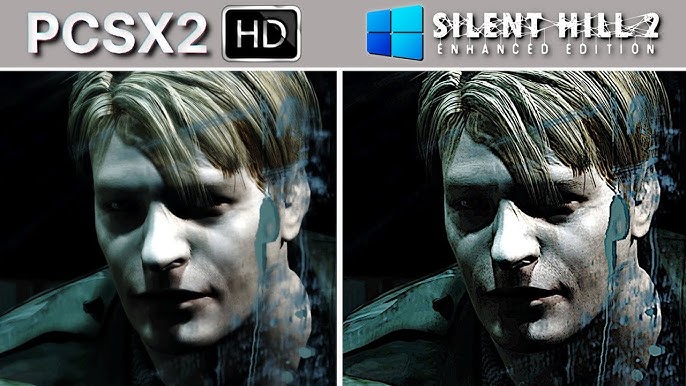
Have you ever wanted to bring an iconic piece of gaming history to life right on your PC? Well, you’re in luck! Today, we’re about to embark on a thrilling journey to resurrect Silent Hill 2 (2001) using the mighty PCSX2 emulator. Trust me, you’re in for an unforgettable adventure through mist-laden streets and chilling encounters.
Setting Up PCSX2 for Silent Hill 2 (2001)
Alright, first things first, you’ll need PCSX2, the magic wand, so to speak, that makes this all happen. Imagine it as your ticket to the most haunted ride of your gaming life. We start our journey by grabbing the latest version from PCSX2’s official website. It’s the lifeline that’ll transform your PC into a virtual PS2 console.
Once you’ve downloaded it, let’s work some magic configuring it for your hardware setup. Depending on your PC’s capabilities, you can tweak a few settings. If you’re gunning for the best performance, opt for either Vulkan or DirectX as your rendering option. It’s like choosing the perfect gear before walking into the fog – every decision counts!
Preparing Game Files
Here’s where the real fun begins! You’ve got Silent Hill 2, the PS2 classic. How do we get it into your PC? Through the mystical world of ISO files! Don’t worry; it’s just a fancy way of saying we’re going to create a digital copy of your game disc, also known as an ISO.
To keep everything on the up-and-up legally, use your own PS2 disc to create that ISO. Think of it as making a backup of your cherished childhood memories – totally legit!
And what’s a PS2 without its BIOS? Not much, my friend. You’ll also need to get your hands on the PS2 BIOS files legally. It’s like the secret key that lets you start the console. If you have a PS2 lying around, there are ways to dump these files using your console.
So, we have our Silent Hill 2 ISO and our BIOS, all set! Let’s move on to breathe life into this adventure.
Customizing Your Gameplay Experience
Welcome to the world where keyboards reign supreme. Don’t have a controller? No sweat! You can map your keyboard controls right in the PCSX2 settings. With a few clicks, your keyboard becomes the gateway to Silent Hill, helping you navigate through darkness just like a seasoned pro.
But why stop there? Let’s level up. Fancy putting lipstick on the spooky beast? You can enhance the graphics and performance to create something truly stunning. Load up HD texture packs, implement widescreen hacks, and unlock 60 FPS patches – all transforming your game into a visual masterpiece. Silent Hill never looked so spine-chillingly beautiful!
Why Choose PCSX2 for Silent Hill 2?
Here’s the thing: the original PS2 version of Silent Hill 2 holds a certain charm and authenticity that’s hard to beat. The fog is denser, the shadows more ominous, and the overall atmosphere just hits differently. PCSX2 helps retain these original effects while enhancing them with modern fixes – it’s like drinking the perfect blend of nostalgia and novelty.
If you’ve got the Greatest Hits edition, there’s extra content waiting for you. This makes emulation an enticing choice, offering added layers to your already rich experience.
Comparing Emulation Options
Now, before you decide, let’s put our options on the table:
PCSX2 (PS2): This one’s a no-brainer if you want those classic effects with the added bonus of high-resolution support. Picture-perfect, right?
Xemu (Xbox): Enhanced lighting is cool, but the downgraded fog is a missed opportunity for chills.
RPCS3 (PS3 HD): Steady gameplay, but HD has its quirks, like thin fog and a cap at 30 FPS.
Xenia (Xbox 360 HD): Widescreen, yay! But, sadly, visual quality faces some hiccups.
Looking for that near-perfect mix of visuals and atmospherics? PCSX2 is definitely the way to go.
Exploring PC Native Versions
But wait, there’s more! If diving into emulators doesn’t float your boat, there’s still a Plan B. You can go the route of installing the original PC port from 2001. Though it’s classic, it could use some modern tweaks.
Enter the Enhanced Edition Mod! This masterpiece mod brings something special to the story: modern fixes, improved visuals, restored effects from the PS2, and much more. You simply install it on your PC version, and boom! It’s like Silent Hill has been polished and made ready for a performance on today’s stages.
Staying Legal and Optimized
We’ve talked about the excitement, but how about we cover the crucial stuff? Staying legal is all-important on this journey. The golden rule? Use ISO and BIOS files from your owned copies of the game. Downloading them is a no-go. It’s like keeping your costumes precisely for the roles you own!
Performance optimization is next on our list. Every PC setup is different, so you might need to try different configurations in PCSX2. It’s like adjusting your sails according to the wind – it keeps your journey smooth.
Are you ready to bring Silent Hill 2 to life on your PC? With the right setup and some magical tweaks, we’re talking about an experience filled with eerie streets, chilling ambiance, and a story that clutches at your soul. Ready to step into the foggy adventure? Let’s get started right away and unlock a world echoing with tales that refuse to fade!
And oh, by the way, if you’re looking for more thrilling insights about things that inspire us, jump over to Smart Business Mag. Find stories that captivate and fuel your passions there!
Now go, boot up that PC, set your heart racing, and relish in the horror-filled adventure that is Silent Hill 2. Happy haunting!
Also Read:
